Platform
Updates installed on your schedule
Scan devices for missing updates, install them when it suits you and ask people before a restart. Windows uses the Windows Update Agent; Linux uses apt or dnf.
14-day Business trial, no cardFree forever for 3 personal devices
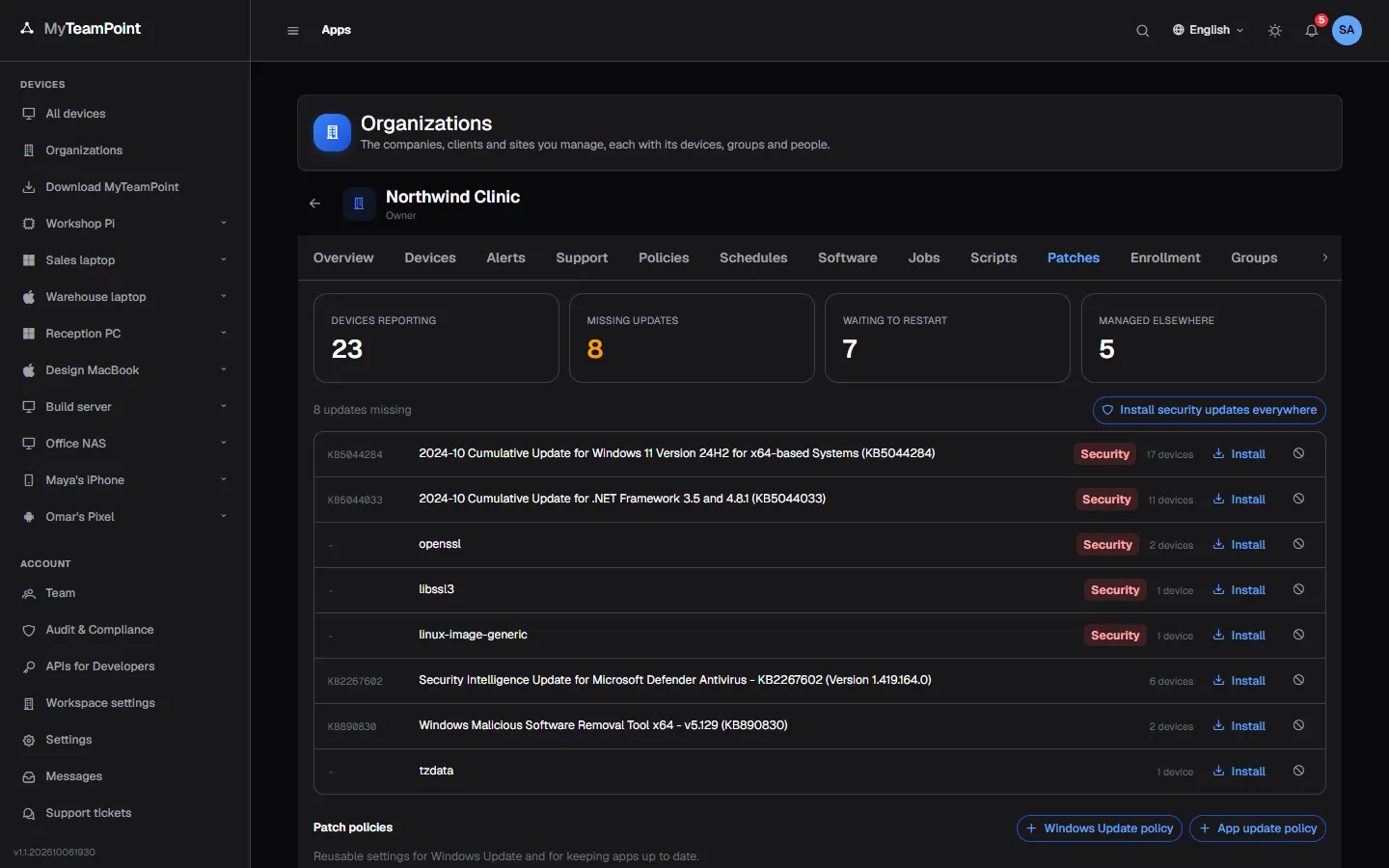
What it does
Scan and install Windows and Linux updates on your schedule.
Scan and install
See Missing, Failed, Rejected and Recently installed on every device.
- Windows Update Agent on Windows
- apt or dnf on Linux, servers included
- Reports what installed, what failed and if a restart is needed
Patch policies and schedules
Write a patch policy once and link it to the organizations that need it.
- Daily, weekly or monthly, in the right time zone
- Maintenance windows and a spread per device
- Offline devices catch up when they are back
Restarts people accept
Ask the person at the PC before a restart, with a deadline.
- Restart now or later
- Deferrals up to your limit, then a countdown
- Nobody signed in: it restarts at once
Across the organization
Install one update on every device that misses it, or reject it everywhere.
- Counts per organization
- WSUS and Intune devices named, not fought
- Every install is a signed job
Try it on your own devices
Start a 14-day Business trial with 2 technician licenses and no card, or stay on Free for up to 3 personal devices with the whole product.